# Core Processes

This portion will contain the process guides for the Onboarding department.

# Portal Creation

*This page walks you through the exact steps to create a new client's portal in GoHighLevel — a task that must be completed immediately upon payment and sets the foundation for their entire experience with us.*

## Portal Creation — Step-by-Step Guide

This guide walks Onboarding Specialists and other members of Customer Service through the complete process of creating a new client's portal in GoHighLevel (GHL). This must be completed within at least 30 minutes of a client's payment being received if it is during business hours.

<div id="bkmrk-%E2%8F%B1%EF%B8%8F-time-requirement-" style="background: #f0f4ff; border-left: 5px solid #2b386d; padding: 16px 20px; margin: 16px 0;">**⏱️ Time Requirement**  
Portal creation should take approximately 10–15 minutes per client. Complete this task immediately when you receive a new client notification.</div>## Before You Begin

Confirm you have the following information from the client's purchase record:

- ✅ Client's full name
- ✅ Client's email address
- ✅ Client's phone number
- ✅ Plan purchased (Essentials/Accelerated/Momentum)
- ✅ Mark the invoice as paid if it is a web purchase or the payment was made through CashApp or Zelle
- ✅ Add any special instructions the Dispute Team must know in Additional Information on DisputeFox

## Step-by-Step: Creating the Client Portal

### Step 1 — Verify Payment in GoHighLevel (GHL)

Once you receive a portal creation request from the closer:

1. Copy the client’s full name
2. Open **GHL (GoHighLevel)**
3. Paste the client’s name into the search bar
4. Verify that the payment has been successfully processed
5. Confirm the membership type purchased: 
    - Accelerated
    - Essential Membership
    - Momentum (6-Month Bundle)

**After verification:**

- - Mark the client with a ⭐ (star) on GHL

### Step 2 — Open Client in DisputeFox (DF)

1. Open **DisputeFox (DF)**
2. Navigate to the **Client Tab**
3. Locate the client under **Active Clients**
4. Click on the client's name

### Step 3 — Verify Client Details

1. Go to the **Account Tab**
2. Copy the client’s **First Name** (this will be used for the password)
3. Navigate to **Client Settings**
4. Confirm the membership status: 
    - For English-speaking clients: Essentials (Slow Delete); For <span style="background-color: rgb(251, 238, 184);">Spanish-speaking clients: </span>Essentials (Spanish Slow Delete)
    - All clients: Accelerated (Accelerated)
    - All clients: Momentum (6-Month Bundle)

<div id="bkmrk-%E2%9A%A0%EF%B8%8F-gold-box-%E2%80%94-import" style="background: #fff8e6; border-left: 5px solid #d59941; padding: 16px 20px; margin: 16px 0;">**⚠️ Important**  — Ensure this matches the membership purchased in GHL</div><span style="background-color: rgb(251, 238, 184);">**If Spanish-Speaking client:** </span>

Assign the correct agreement based on the client’s plan:

[![agreement 1.jpg](https://wiki.getcrownedcredit.com/uploads/images/gallery/2026-04/scaled-1680-/agreement-1.jpg)](https://wiki.getcrownedcredit.com/uploads/images/gallery/2026-04/agreement-1.jpg)
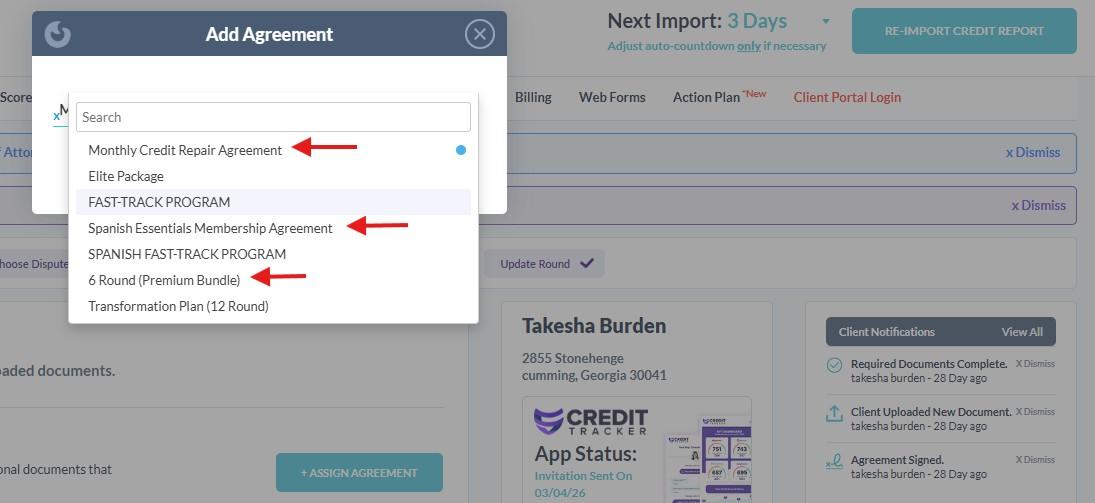
- - **Essential (Slow Delete)** → *Spanish Essential Membership*
    - **Accelerated** → *Monthly Credit Repair Agreement*
    - **Momentum** → *Six Month Premium Bundle*

Portal Settings

[![save 111.png](https://wiki.getcrownedcredit.com/uploads/images/gallery/2026-04/scaled-1680-/save-111.png)](https://wiki.getcrownedcredit.com/uploads/images/gallery/2026-04/save-111.png)
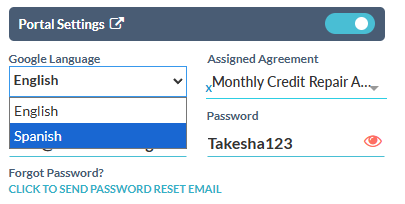
1. Go to **Portal Settings**
2. Locate **Google Language**
3. Change language to **Spanish**

### Step 4 — Update SMS Settings

1. Locate **SMS References**
2. Click **Opt-Out**

### Step 5 — Update Portal Password

1. Go to **Portal Settings**
2. Click the 👁 (eye icon) to view the current password
3. Update the password using the following format: FirstName123

<div id="bkmrk-%F0%9F%92%A1-rules-no-spaces-us" style="background: #f0f4ff; border-left: 5px solid #2b386d; padding: 16px 20px; margin: 16px 0;">**💡 Rules**- No spaces
- Use only the client’s first name
- Add “123” immediately after
- E.g. Maria → `Maria123`

</div>### Step 6 — Assign Agent

1. Under **Assigned Agent**: 
    - If the client is English-speaking → select **MARJORIE MERCADERO**
    - If the client is Spanish-speaking → select **GIO MENDEZ**
2. Click **Save Changes**

### Step 7 — Send Credit Tracker Invitation

[![assign autofox.jpg](https://wiki.getcrownedcredit.com/uploads/images/gallery/2026-04/scaled-1680-/assign-autofox.jpg)](https://wiki.getcrownedcredit.com/uploads/images/gallery/2026-04/assign-autofox.jpg)
1. Scroll to **Credit Tracker App Status**
2. Click **Send Invitation**
3. In the pop-up window: 
    - Click **Send** or **Save &amp; Send**

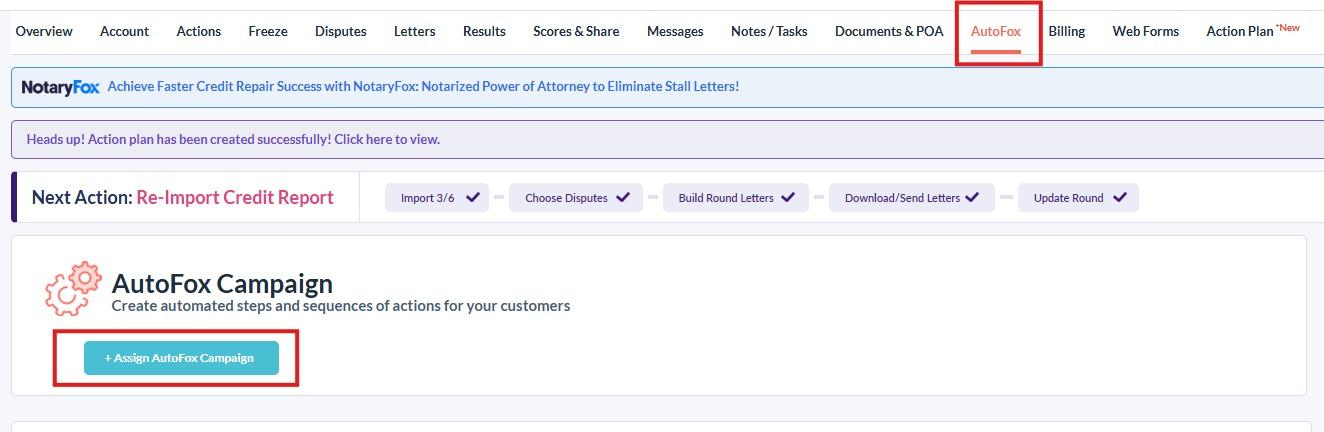
### Step 8 — AutoFox Assignment

[![assign autofox.jpg](https://wiki.getcrownedcredit.com/uploads/images/gallery/2026-04/scaled-1680-/assign-autofox.jpg)](https://wiki.getcrownedcredit.com/uploads/images/gallery/2026-04/assign-autofox.jpg)

1. Click on **AutoFox**
2. Click **Send** or **Assign**This will generate and send the client’s login credentials.
    
    <div id="bkmrk-%E2%9A%A0%EF%B8%8F-important%C2%A0-%E2%80%94-doub" style="background: #fff8e6; border-left: 5px solid #d59941; padding: 16px 20px; margin: 16px 0;">**⚠️ Important**  — Double check if the onboarding email is reflected by viewing the conversation with the client on GHL</div>

### Step 9 — Send Portal Creation Message (GHL)

[![portal completion snipper.jpg](https://wiki.getcrownedcredit.com/uploads/images/gallery/2026-04/scaled-1680-/portal-completion-snipper.jpg)](https://wiki.getcrownedcredit.com/uploads/images/gallery/2026-04/portal-completion-snipper.jpg)
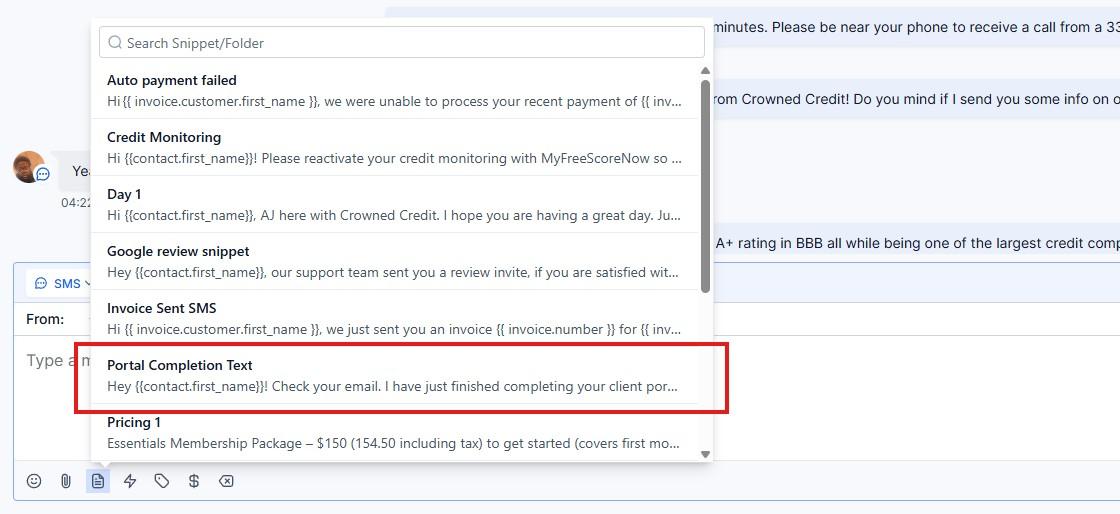
1. Return to **GHL**
2. Send the prepared **portal creation snippet** to the client

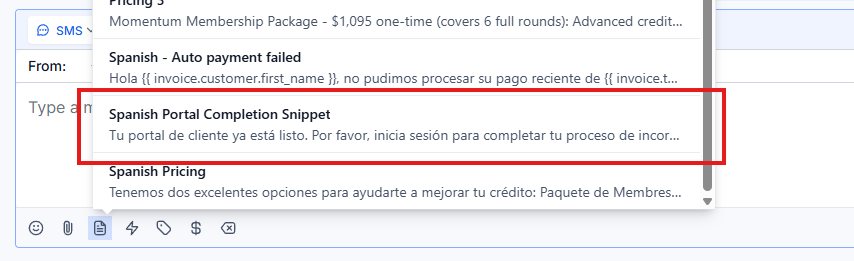
<span style="background-color: rgb(251, 238, 184);">**If Spanish-Speaking client:** </span>

<span style="background-color: rgb(251, 238, 184);">**[![spanish comp.png](https://wiki.getcrownedcredit.com/uploads/images/gallery/2026-04/scaled-1680-/spanish-comp.png)](https://wiki.getcrownedcredit.com/uploads/images/gallery/2026-04/spanish-comp.png)**</span>

1. Return to **GHL**
2. Send the prepared **Spanish portal creation snippet** to the client

### Step 10 — Update Closer (Discord)

1. Open **Discord**
2. Reply to the closer’s request
3. Send: Done

# Orientation Call

*This page gives you the full script, checklist, and goals for the Orientation Call — which should be done after onboarding has been completed. This sets the tone for the program and manages expectations early on.*

## Orientation Call — Script &amp; Checklist

The Orientation Call is the time where we can set client expectations early on to avoid any misconceptions about the process, as well as provide some key reminders to make sure the process goes smoothly. Keep it warm, confident, and energizing.

<div id="bkmrk-%F0%9F%93%8B-call-overview-dura" style="background:#f0f4ff;border-left:5px solid #2b386d;padding:16px 20px;margin:16px 0;">**📋 Call Overview**  
**Duration:** 5-10 minutes  
**Goal:** Welcome the client, set expectations, build trust, and provide all reminders  
**Tone:** Warm, professional, confident — like a trusted advisor, not a call center agent  
**Tools Open:** GHL (contact record), SmartCredit (ready but not yet reviewing)</div>## Pre-Call Checklist

Complete these tasks before dialing:

<div id="bkmrk-task-done%3F-review-th" style="margin:20px 0;"><div style="margin:16px 0;"><table id="bkmrk-task-done%3F-review-th-1" style="width:100%;border-collapse:collapse;margin:20px 0px;height:285.375px;"><thead><tr style="background:rgb(43,56,109);color:rgb(255,255,255);height:41.7969px;"><th style="background:rgb(43,56,109);color:rgb(255,255,255);padding:12px;text-align:left;height:41.7969px;">Task</th><th style="background:rgb(43,56,109);color:rgb(255,255,255);padding:12px;text-align:left;height:41.7969px;">Done?</th></tr></thead><tbody><tr style="background:rgb(249,249,249);height:37.7969px;"><td style="padding:10px;border:1px solid rgb(221,221,221);height:37.7969px;">Confirm if onboarding has been completed</td><td style="padding:10px;border:1px solid rgb(221,221,221);height:37.7969px;">☐</td></tr><tr style="height:54.5938px;"><td style="padding:10px;border:1px solid rgb(221,221,221);height:54.5938px;">Review the client's GHL contact record — know their name, plan, signup date</td><td style="padding:10px;border:1px solid rgb(221,221,221);height:54.5938px;">☐</td></tr><tr style="background:rgb(249,249,249);height:37.7969px;"><td style="padding:10px;border:1px solid rgb(221,221,221);height:37.7969px;">Have the call script open and ready</td><td style="padding:10px;border:1px solid rgb(221,221,221);height:37.7969px;">☐</td></tr><tr style="height:37.7969px;"><td style="padding:10px;border:1px solid rgb(221,221,221);height:37.7969px;">Aircall is set to "Unavailable" if you are making an outbound call</td><td style="padding:10px;border:1px solid rgb(221,221,221);height:37.7969px;">☐</td></tr></tbody></table>

</div></div>## Call Script

### Opening 

Hi {{contact.first\_name}}, this is \[Agent\] from Crowned Credit — just wanted to do a quick orientation after your onboarding and make sure everything is clear on your end. So as of now, your credit reports have already been forwarded to our Dispute Team, and you’re enrolled in the \[Essentials/Accelerated/Momentum\] Plan at \[$99 per month/$199 per month/a one time fee of $1095\].

Your plan is billed monthly \[except for Momentum\], and it also includes our 90-day refund policy in the event that no major negative items are removed within that timeframe. In terms of timeline, you can expect your first set of results within about 30 to 35 days, since that’s the standard investigation period with the credit bureaus.

### Client Responsibilities

“While we’re working on your file, there are a few important things on your end:

- Keep an eye out for messages in the portal from our dispute team
- If you receive any letters from creditors or the bureaus, don’t respond to them — just upload them to your client portal so our team can review
- Make sure to keep your credit monitoring subscription active so we can continue accessing your reports
- Avoid making payments on any collections or charge-offs that are currently being disputed
- But continue making on-time payments on any active accounts you have.”

### Normalize Fluctuations

“Also, just a heads up — your credit score may fluctuate during the process, and that’s completely normal while disputes are ongoing.”

### Where Updates Happen

“All updates will be posted in your client portal on a monthly basis, so that will be your main place to track progress. We also send a progress report through email.”

### Support + Accessibility  


If anything important comes up on your file, one of our Case Specialists will reach out to you directly. And of course, if you ever need anything, you can always give us a call at 336-310-0090 — we’re here to help.

### Closing

That’s everything on my end — do you have any questions for me right now, or anything you’d like me to clarify? \[If none,\] Thank you for your time, and have a good rest of your day.

<div id="bkmrk-%E2%9A%A0%EF%B8%8F-important-%E2%80%94-%22ort-" style="background:#fff3cd;border:1px solid #d59941;padding:12px 16px;margin:16px 0;">**⚠️ Important — "ort-done" Tag:** After completing the orientation call, you **must** add the `ort-done` tag to the client's GHL contact record. This tag stops the onboarding automation from sending reminders to clients who have already completed onboarding and orientation. If you skip this step, the client will receive confusing "complete your onboarding" messages — this causes unnecessary support tickets and a bad client experience. </div>## Post-Call Checklist

<div id="bkmrk-task-done%3F-log-call-" style="margin:20px 0;"><div style="margin:16px 0;"><table id="bkmrk-task-done%3F-log-call--1" style="width:100%;border-collapse:collapse;margin:20px 0;"><thead><tr style="background:#2b386d;color:#ffffff;"><th style="background:#2b386d;color:#ffffff;padding:12px;text-align:left;">Task</th><th style="background:#2b386d;color:#ffffff;padding:12px;text-align:left;">Done?</th></tr></thead><tbody><tr><td style="padding:10px;border:1px solid #ddd;">Update pipeline stage to "Orientation Call Complete"</td><td style="padding:10px;border:1px solid #ddd;">☐</td></tr><tr><td style="padding:10px;border:1px solid #ddd;">**Add the "ort-done" tag to the client's GHL contact** — This tag tells GHL the orientation is complete and prevents onboarding reminder automations from re-firing. Without this tag, clients will keep receiving "complete your onboarding" messages even after they are fully onboarded.</td><td style="padding:10px;border:1px solid #ddd;">☐</td></tr><tr><td style="padding:10px;border:1px solid #ddd;">Relay any additional concerns to the appropriate agent if there are any</td><td style="padding:10px;border:1px solid #ddd;">☐</td></tr><tr><td style="padding:10px;border:1px solid rgb(221,221,221);">If the client did not pick up and it went to voicemail, send them the orientation SMS instead</td><td style="padding:10px;border:1px solid rgb(221,221,221);">☐</td></tr></tbody></table>

</div></div>### Orientation SMS Template

> Hi {{contact.first\_name}}, this is \[Agent\] from Crowned Credit-Onboarding. I just wanted to give you a quick recap on your onboarding.
> 
> Your credit reports have been successfully submitted to our Dispute Team, and you’re enrolled in the (Essentials/Accelerated/Momentum Plan) for ($99/$199)/month. \[End at Momentum Plan for clients on Momentum.\]
> 
> Your plan is billed monthly and it includes a 90-day refund policy if no major negative items are removed. Most clients begin to see initial results within 30–35 days.
> 
> While we’re working on your file, please keep the following in mind:  
> • Check your client portal regularly for updates and messages from our Dispute Team  
> • Keep your credit monitoring subscription active  
> • Upload any letters you receive to your portal (no need to respond to them)  
> • Avoid making payments on collections or charge-offs that are being disputed  
> • Continue making on-time payments on your active accounts
> 
> Please note that your credit score may fluctuate during the process this is completely normal. Updates will be posted in your client portal on a monthly basis.
> 
> If anything important comes up, one of our Case Specialists will reach out to you. You can also contact us anytime at 336-310-0090 if you need assistance.
> 
> We’re excited to work with you and help you reach your credit goals!
> 
> \[Agent\]  
> Crowned Credit – Onboarding